Note: The following information applies to the Windows Version at the IS945.x Tablet with Windows on ARM .
In this guide, you will learn how to create a recovery medium for the i.safe MOBILE IS945 running Windows on ARM.
For this it will be necessary the following parts
 | a PC with Windows |
| Win32 Disk Imager / https://win32diskimager.org/download/ |
| the WINDOWS Image from i.safe MOBILE for the IS945 with Windows on ARM/ you can download from here i.safe MOBILE Windows File for IS945 with WIN on ARM |
| a Pen Drive with 64 GB / we suggest the SanDisk Ultra Dual Drive Luxe USB Type-C |
NOTE: All Data on the USB Pen Drive will be removed
Create the recovery media
| Open WIN32 Disk Imager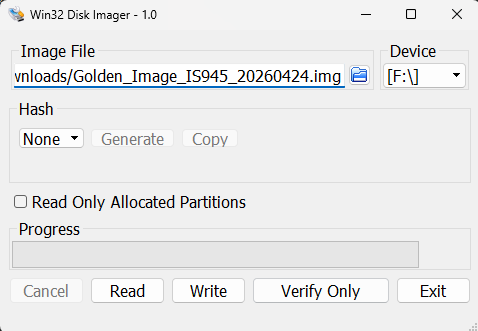 |
| Click at Image File and chose the File provided from i.safe MOBILE |
| Click on Device and select the USB Pen Drive |
| Click on Write to start the action |
After creating the recovery media please follow this FAQ for installing the Image at the IS945.